
The Ralph Wiggum Loop: How AI Coding Agents Keep Moving Until a Feature Is Finished
AI coding tools can feel almost unreal the first time you use one. You describe an idea, the tool reads your files, writes code, runs commands, fixes errors, and gives you something that looks much closer to a real product than you expected.



Then reality hits.
The AI makes a feature that works halfway. It fixes one error but creates another. It starts changing unrelated files. It forgets an important requirement from earlier in the conversation. Or it confidently announces that the job is done even though the app still does not build.
That is where the Ralph Wiggum Loop comes in.
The Ralph Wiggum Loop is not a specific app, coding language, or magic setting you turn on in Codex. It is a workflow for getting AI coding agents to repeatedly move through a focused cycle: understand the current state of a project, choose the next useful task, make a change, test it, learn from the result, and continue.
The name sounds silly because it is. It comes from Ralph Wiggum, the lovable but chaotic Simpsons character. But the underlying idea is serious: AI agents are much more useful when they have a structured environment and clear feedback than when they are simply told, “Build my entire app.”
For beginners, solo founders, and curious builders, this matters because the real opportunity is not just asking AI to write a few lines of code. It is learning how to guide an agent through a growing product without letting the project become a pile of random files and half-finished features.
What Is the Ralph Wiggum Loop?
In its simplest form, a Ralph Wiggum Loop is a repeated AI-agent workflow.
Instead of treating an AI coding tool like a one-time chatbot, you give it an ongoing process:
- Read the project instructions and current status.
- Identify the next highest-priority task.
- Make one focused improvement.
- Run the relevant tests, build command, linting, or manual check.
- Fix anything that failed.
- Record what changed.
- Repeat until the task is truly complete.
The “loop” part is important. A coding agent should not just write code once and declare victory. It should be able to see the result of its own work, notice what broke, and respond to real feedback.
Think of it like building a deck in your backyard. You would not dump every board, screw, tool, and bag of concrete into the yard and say, “Make a deck.” You would start with a plan, build the footings, check that they are level, frame the structure, measure again, and only then move on to the next stage.
The Ralph Wiggum Loop applies that same common sense to AI coding.
You give the agent a plan. You make it prove that each small piece works. You keep track of what has already been done. And you do not let it move forward when the current stage is broken.
Why This Is Different From Normal AI Prompting
Normal AI prompting often looks like this:
“Build me a web app that collects newsletters, summarizes them, finds content opportunities, creates briefs, has user accounts, and looks professional.”
That prompt may produce something impressive-looking. It may even create a working prototype. But it also gives the AI too many decisions to make at once.
What should the data model look like? Which feature comes first? How should users log in? What happens when a newsletter fails to import? Where should errors appear? Which parts need tests? What does “professional” even mean?
When the task is too broad, the agent has to guess. And the more it guesses, the more likely it is to build something that looks busy but does not match what you actually need.
A Ralph-style workflow replaces one giant vague request with a series of small, verifiable tasks.
For example, a solo builder creating a newsletter-to-briefing product might break the work into milestones like this:
- Create the basic project structure.
- Add a simple page where a user can paste newsletter text.
- Store submitted newsletters in a database.
- Extract a title, source, date, and summary.
- Display saved summaries in a clean list.
- Add filters for different topics.
- Create a basic “content opportunity” score.
- Add user login only after the core workflow works.
Each milestone has a clear purpose. Each one can be tested. And each one gives the next AI session a better foundation to work from.
That is a much smarter way to build than asking an agent to “finish the whole SaaS.”
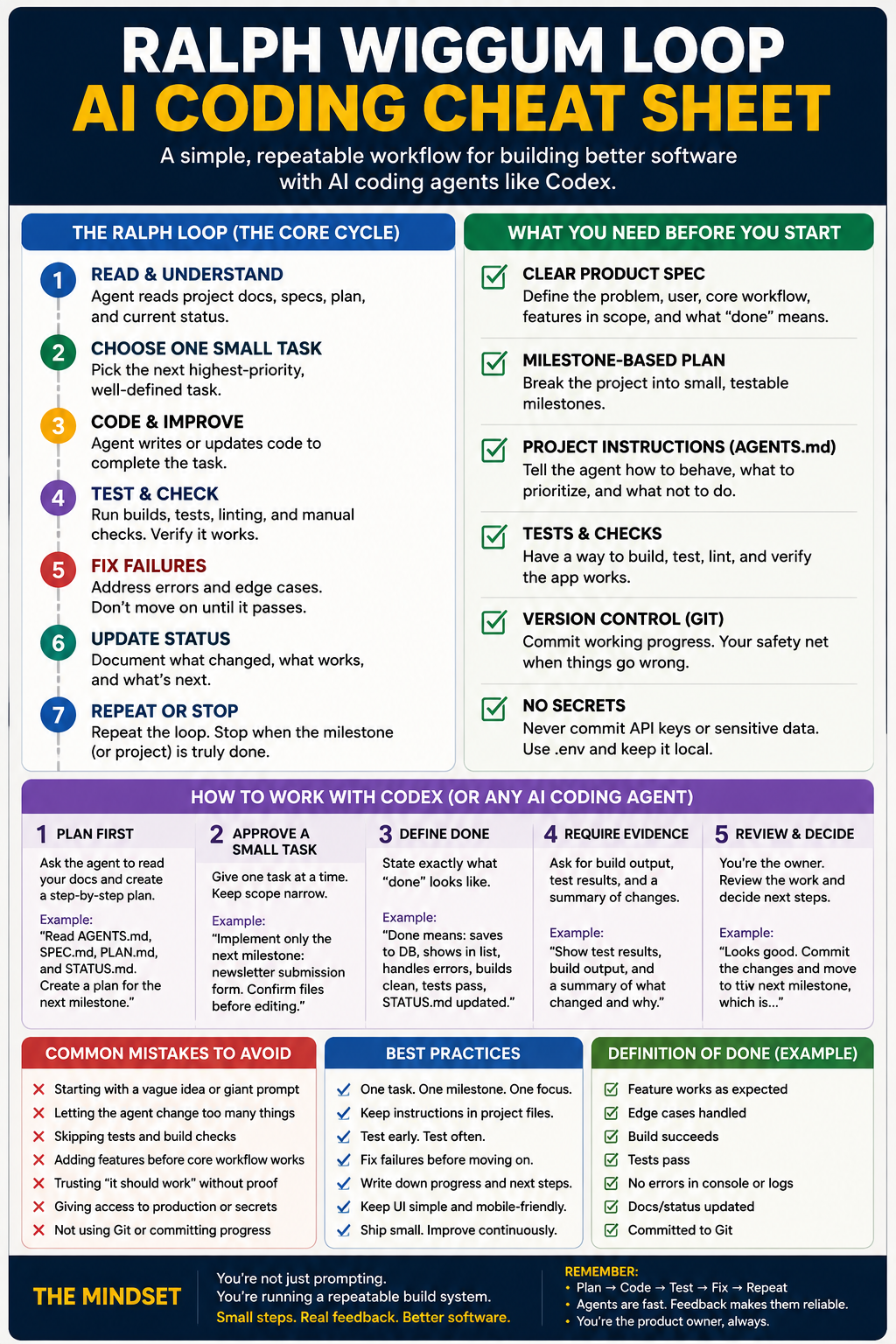
The Basic Ralph Loop in Plain English
A useful Ralph Wiggum Loop does not need to be complicated. At its core, it follows a repeatable pattern.
1. Give the Agent Durable Instructions
The agent needs to understand the project before it starts touching code.
That means it should have access to files that explain:
- What the product is supposed to do.
- Who it is for.
- What features are currently planned.
- What technologies the project uses.
- What rules it must follow.
- How to test the project.
- What “done” means for a task.
These instructions should live inside the project, not only in an old chat conversation.
This matters because AI agents do not have perfect long-term memory. A new coding session may not know what happened yesterday. But it can read a project file.
That is why simple files such as AGENTS.md, SPEC.md, PLAN.md, and STATUS.md are so useful. They act like a site map, work order, and job log for the AI.
2. Choose One Meaningful Task
The biggest discipline in the Ralph Wiggum approach is limiting the scope.
Do not ask the agent to build five major features at once. Ask it to complete one useful task that can be checked.
Good tasks sound like this:
- “Add a form that saves newsletter text to the database.”
- “Fix the mobile layout on the dashboard.”
- “Write tests for the content scoring function.”
- “Show a clear error message when a newsletter import fails.”
- “Create the first version of the content brief page.”
Bad tasks sound like this:
- “Make the app better.”
- “Finish the dashboard.”
- “Improve everything.”
- “Turn this into a professional SaaS.”
- “Fix all bugs.”
The first group gives the agent a target. The second group gives it a vague feeling.
AI does better work when the next move is obvious.
3. Make the Change
This is the part most people focus on: the agent writes code.
But code generation is only one part of the process. It is not the finish line.
An AI agent can create a database table, build a page, add a button, write an API route, or change a component in seconds. That speed is useful, but it can also create a false sense of progress.
A feature is not finished because the code exists. It is finished when the feature behaves correctly and does not break the rest of the product.
4. Run Real Checks
This is where the loop becomes valuable.
After changing code, the agent should run whatever checks make sense for the project:
- Build the app.
- Run tests.
- Run linting.
- Check for TypeScript errors.
- Start the local development server.
- Verify that the relevant page loads.
- Test the new feature with realistic sample data.
- Review the changed files for accidental edits.
The AI should not be allowed to casually say, “This should work.”
It should show evidence that the feature works.
For a beginner, this is probably the most important lesson in the entire article: do not trust generated code just because it looks convincing. Ask for proof.
5. Fix Failures Before Moving On
If the build fails, the agent should not move to the next feature.
If a test fails, the agent should not ignore it.
If the app crashes when a form is submitted, that needs to be handled before adding another menu, animation, or dashboard widget.
This creates what developers often call feedback or backpressure. The system pushes back when something is wrong.
Without feedback, an AI agent can keep generating more code on top of a broken foundation. Eventually, you have a large project with a lot of files and no clear idea which part caused the first problem.
With feedback, the agent has to keep repairing the current task until it meets the agreed standard.
6. Record the Result
Once a task is complete, the agent should update the project’s status.
This can be as simple as a short note:
- Completed: newsletter submission form.
- Verified: app builds and data saves correctly.
- Next task: display saved newsletters in a list.
- Known issue: duplicate source detection still needs work.
That note might feel unnecessary at first. It is not.
It gives the next agent session a clean handoff. It also gives you a way to understand the project without reading hundreds of lines of code.
For solo builders, this is huge. You are not only building software. You are building a system that lets you return to the project after a day, a week, or a month without feeling lost.
The Four Pieces You Need Before Letting an AI Agent Run
You do not need a complicated automation setup to use this idea well. But you do need a few basics.
A Clear Product Specification
Your specification does not need to be a 100-page corporate document.
For a small app, it can be a simple file that explains:
- The problem the app solves.
- The target user.
- The main workflow.
- Features that are in scope.
- Features that are not in scope yet.
- Design preferences.
- Important technical rules.
- Privacy or security concerns.
For example, a newsletter intelligence app might say:
The app helps creators and small businesses turn newsletters and industry sources into short summaries, content opportunities, and structured briefs. It should be simple, mobile-friendly, and useful before advanced automation is added.
That gives the AI direction without forcing you to design every single screen in advance.
A Milestone-Based Plan
A plan turns a vague idea into a build order.
The best milestones are small enough that the AI can complete, verify, and explain them in one focused session.
A strong plan might include:
- Set up the project and confirm the app runs locally.
- Create the core database structure.
- Build the first input workflow.
- Save and display basic user data.
- Add the first useful AI-assisted feature.
- Improve the interface.
- Add error handling.
- Test the core user journey.
- Prepare a simple deployment version.
This prevents the common “random feature treadmill” where the agent adds things because they sound cool instead of because they move the product forward.
A Project Instruction File
For Codex users, an AGENTS.md file is especially useful.
This file can tell the AI how to behave every time it works in the project.
For example:
# Project Rules

- Read SPEC.md, PLAN.md, and STATUS.md before making changes.
- Work on one milestone at a time.
- Do not change unrelated files unless necessary.
- Run the build and relevant tests after changes.
- Fix errors before moving to the next task.
- Do not expose API keys, secrets, or production data.
- Update STATUS.md with completed work and remaining issues.
- Explain any new dependency before adding it.
- Keep the interface simple, mobile-friendly, and accessible.
That is not glamorous. It is effective.
The more consistently an AI agent sees the project rules, the less likely it is to wander off into unnecessary changes.
A Way to Roll Back Bad Changes
Use Git from the beginning.
You do not need to be an expert developer to understand why. Git gives you restore points.
When the agent finishes a working milestone, commit it. If the next experiment breaks the app, you can go back to the last known-good version instead of trying to untangle a mess.
A simple mindset works well:
Do not let the agent build on top of uncertainty.
If the current version works, save it. Then move forward.
A Safer Ralph-Style Workflow With Codex
You do not need to run a literal infinite loop to benefit from this strategy.
In fact, beginners should usually avoid leaving an agent completely unattended for long periods. The better starting point is a bounded loop: let Codex work through one milestone, inspect the result, then decide whether to continue.
Here is a practical workflow.
Step 1: Start With Planning, Not Coding
Before asking Codex to build, ask it to inspect the project and create a plan.
Tell it what the product is, what the next milestone should accomplish, and what must be true when the milestone is complete.
For example:
Read AGENTS.md, SPEC.md, PLAN.md, and STATUS.md.

Do not write code yet.

Review the current project state and create a step-by-step implementation plan for the next unfinished milestone. Identify risks, files likely to change, required tests, and a clear definition of done.
This forces the agent to think before it starts editing.
Step 2: Approve a Small Task
Once the plan looks sensible, give the agent one focused task.
Implement the next unfinished milestone only.

Before making changes, confirm which files you will modify and why. Keep the scope narrow. Do not add unrelated features. When finished, run the build and relevant tests. Fix any failures before reporting completion.
That gives you much more control than, “Go build the app.”
Step 3: Require Evidence
A good AI coding request should always include a definition of done.
For example:
Done means:

- The user can submit newsletter text.
- The content is saved successfully.
- The saved item appears in the dashboard.
- Empty submissions show a helpful error.
- The app builds without errors.
- Relevant tests pass.
- STATUS.md is updated.
This is important because it turns your request into a checklist instead of a vague hope.
Step 4: Review the Work Like an Owner
You do not need to inspect every line of code. But you should review the outcome.
Ask yourself:
- Does the feature actually work?
- Does it match the intended user experience?
- Did the agent change anything unexpected?
- Did it add unnecessary packages?
- Did it expose a secret or create a risky shortcut?
- Does the app still work on mobile?
- Is the project becoming simpler or more complicated?
Your job is not to manually write every function. Your job is to make good product and quality decisions.
That is still real work. It is simply a different kind of work.
Why the Ralph Wiggum Loop Works
The biggest reason this approach works is that it gives the AI feedback.
An agent can be wrong in many ways. It can misunderstand a requirement, choose a poor structure, miss an edge case, or accidentally break something that used to work.
But when the workflow includes tests, build checks, logs, written instructions, and small milestones, the agent has more chances to notice and correct its own mistakes.
The real advantage is not that AI becomes perfect.
The advantage is that mistakes become visible earlier.
That is a major shift for solo builders. Instead of getting stuck in endless prompting, you can create a repeatable system where every loop improves the project or reveals what needs attention.
A product like a newsletter analysis app, content brief generator, client dashboard, or small business tool does not need to be built in one heroic session. It needs to become useful one reliable piece at a time.
Where the Ralph Wiggum Strategy Goes Wrong
The Ralph Wiggum Loop can be powerful, but people should not confuse it with full automation magic.
Here are the main ways it goes wrong.
Starting With a Vague Idea
If you do not know what you are building, the agent does not know either.
AI can help you clarify a product idea. But it cannot reliably rescue a project with no target user, no core workflow, and no definition of success.
Start with a useful version one. Not a giant empire.
Giving the Agent Too Much Freedom
A coding agent with broad permissions, vague instructions, and no review process can make a surprising mess.
It may add unnecessary dependencies, rewrite working files, make security shortcuts, or optimize for something you never asked for.
Keep permissions tight. Use version control. Review major changes. Do not give an agent access to production systems or sensitive data unless you understand the risks.
Skipping Testing
This is the classic mistake.
An app can look polished and still fail when someone signs up, submits a form, uploads a file, refreshes a page, or uses it from a phone.
Tests, build checks, error handling, and basic manual testing are not boring extras. They are what separate a demo from a usable product.
Building Features Before the Core Workflow Works
A solo app does not need ten dashboard tabs, multiple integrations, and fancy animations before it can do its main job.
Build the smallest version that solves the main problem.
For a briefing tool, that might mean:
- Add a source.
- Generate a useful summary.
- Save it.
- Turn it into a practical next action.
Everything else can come later.
Assuming the Agent Replaces Judgment
AI can generate options quickly. It can build faster than most beginners can code manually. It can help debug, test, explain, and organize.
But it cannot decide what your customers value as reliably as you can.
It does not know which feature is worth paying for. It does not know whether a workflow feels annoying. It does not know when a “good enough” version should be shipped and tested with real people.
That is still your job.
Should You Run a Literal Infinite Ralph Loop?
Probably not at first.
The original Ralph Wiggum idea is famous for repeated loops that can run for long periods. That can be useful for advanced builders with strong test coverage, clear project files, backups, controlled permissions, and a real understanding of the codebase.
But a beginner does not need to copy the most extreme version of the idea.
The smarter starting point is simple:
- Use clear project files.
- Work one milestone at a time.
- Let Codex plan before coding.
- Require tests and build checks.
- Review changes before moving on.
- Commit working progress.
- Keep a written status log.
That already gives you most of the benefit.
Do not get distracted by the idea of leaving an agent running overnight just because it sounds futuristic. A smaller, controlled loop that actually ships working features is more valuable than an autonomous agent producing hours of expensive confusion.
Final Takeaway: Build a System, Not Just a Prompt
The Ralph Wiggum Loop is really about changing how you think about AI coding.
Instead of looking for the perfect prompt, build a better environment for the agent.
Give it a real target. Give it constraints. Give it a small next task. Give it feedback. Make it verify its work. Save progress. Then repeat.
That is how AI coding becomes less like gambling with prompts and more like running a practical build process.
For solo founders, creators, and curious everyday builders, that is the exciting part. You do not need to become a senior software engineer overnight. But you do need to become good at turning a big idea into a sequence of clear, testable moves.
The person who learns that skill will get far more value from tools like Codex than the person who keeps typing, “Build me the next billion-dollar app.”
Read how AI’s Real Bottleneck is Infrastructure
Related External Links
- How to Ralph Wiggum: The Original AI Development Methodology
https://github.com/ghuntley/how-to-ralph-wiggum - OpenAI Codex Best Practices
https://developers.openai.com/codex/learn/best-practices/
I currently have chatgpt develop me an outline/overview for my app idea. This includes specific steps and each step will have tests. It seems to have been working well for me this far although I should def give these useful external links a read. Also what to do If you try to automate tasks and have an app like codex run all night but yet every minute or so it asks for permissions?